YoutubeTools
All guides / Thumbnail design and channel art
Download a YouTube thumbnail
Copy the individual video's share link and paste it into the downloader.

Start with the video's share link
Open the public video or Short and copy its share link. Paste that link into the homepage tool and select Get thumbnails. A channel page and a playlist without an individual video cannot identify an image. If you copied a message with other text around the link, paste just the URL.
Pick the right result
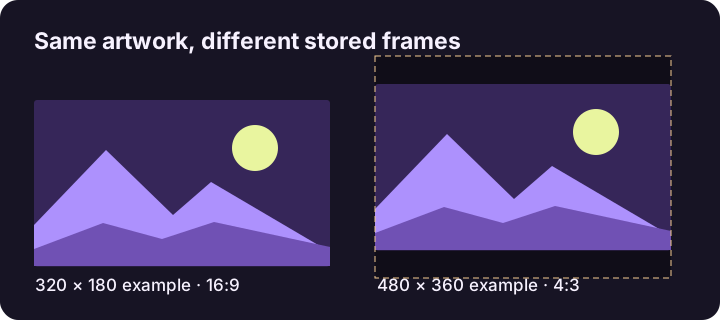
Read each card's measured dimensions and check the artwork. For example, a 480 × 360 version may contain padding around a landscape image, while a 320 × 180 version has a wide frame. Choose the largest useful variant for your task rather than assuming every card has the same crop.
Save and open the file
Select Download JPG. If the browser does not save directly, open the image link and use its image menu. On a phone, the exact save control depends on your browser and operating system. Open the saved file to confirm that it is an image and that its dimensions match the card. Rename it with a video identifier and size if you will collect several files.
When to keep the original instead
A public image is a reference copy. Use the master image for edits or when a smaller published version loses detail. Save artwork you own or have permission to use, and keep the video link with any reference you collect.
Related tool
Get the available image sizes for a public YouTube video or Short.